
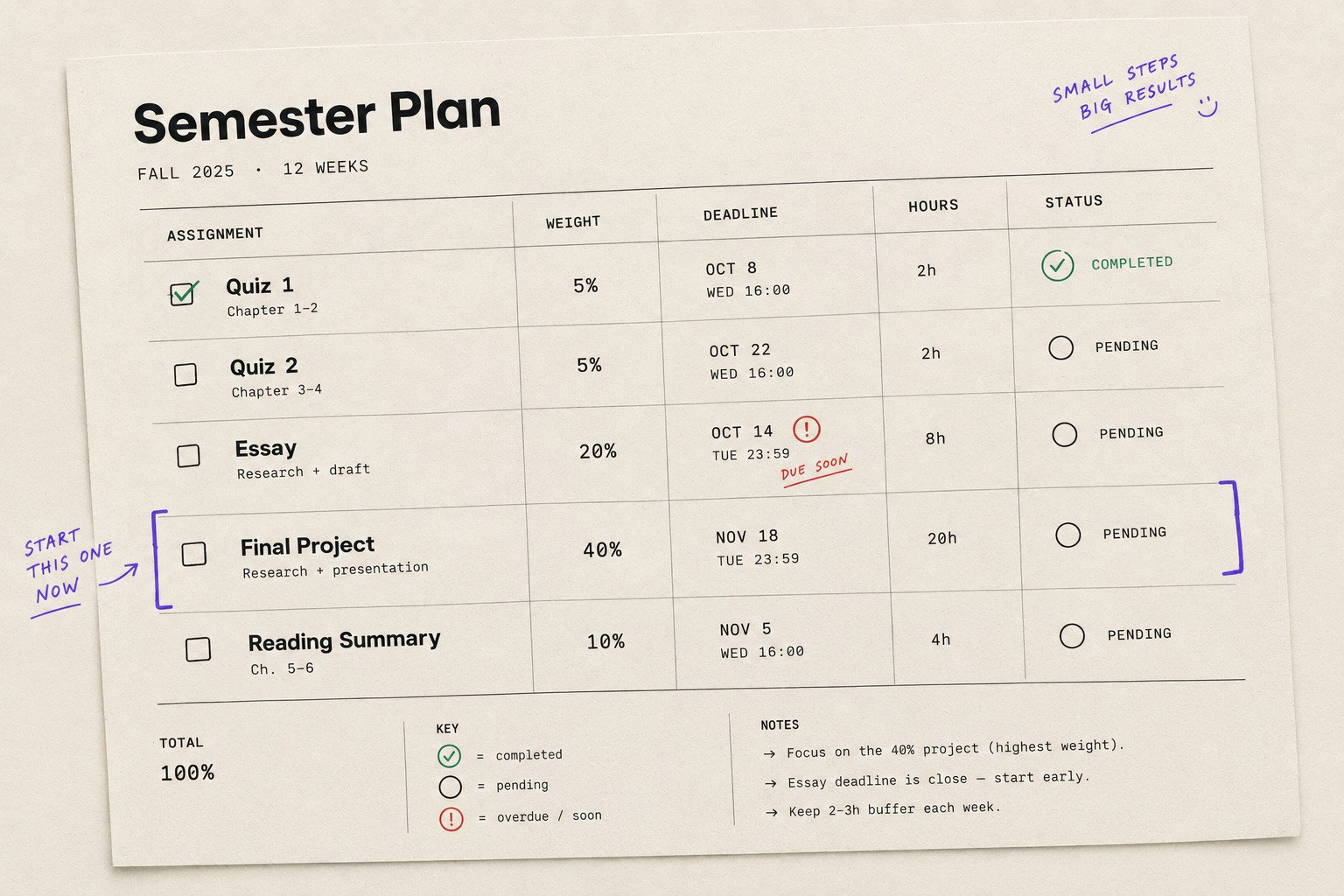
A semester planning template based on grade weight
Oct 5, 2026 · 6 min read
You get your syllabus on the first day of the semester.
There are 47 dates on it.
You put them into your calendar, feel briefly responsible, and move on.
Three weeks later, you are spending two hours on a 3% quiz because it is due tomorrow while a 30% paper sits untouched because it is “not due yet.”
The problem isn't that you failed to make a deadline plan.
The problem is that your plan treats every assignment like it matters equally.
It doesn't.
A better semester plan combines grade weight, deadline, and estimated effort so you can see what deserves attention before it becomes urgent.
Here's the template.
The semester planning template
For every assignment in your syllabus, record five things:
Assignment | Weight | Deadline | Est. hours | Status |
|---|---|---|---|---|
Quiz 1 | 5% | Oct 8 | 0.5 | Not started |
Essay | 20% | Oct 14 | 5 | Not started |
Midterm | 25% | Oct 21 | 8 | Not started |
Final project | 40% | Nov 18 | 15 | Not started |
That's the entire foundation.
You don't need a complicated productivity system with seventeen categories and a dashboard that requires its own tutorial.
You need to know what is worth the most, when it is due, and how much work it will take.
1. Add every graded assignment
Start with the syllabus.
Go course by course and add every assessment that affects your grade.
Include:
Quizzes
Exams
Essays
Lab reports
Presentations
Projects
Homework
Participation, if it is graded
Don't worry about prioritizing anything yet.
Just get everything onto one list.
The goal is to see the semester as a whole instead of discovering major assignments one week at a time.
2. Add the grade weight
Next to every assignment, write its percentage.
This is the part most deadline lists leave out.
A calendar might tell you:
Essay — October 14
Your semester plan should tell you:
Essay — 20% — October 14
That extra number changes how you think about the assignment.
A 20% essay deserves more planning than a 2% homework task.
It doesn't necessarily deserve more daily attention. But it deserves enough space in your semester that you aren't starting it two nights before it is due.
3. Estimate the actual workload
Now add estimated hours.
This does not need to be perfectly accurate.
You're trying to distinguish between:
QUIZ · 5% · 30 MIN
and
RESEARCH PAPER · 25% · 12 HRS
That distinction matters when several deadlines collide.
A 25% paper due next week might look less urgent than a 5% quiz due tomorrow.
But if the paper needs 12 hours, waiting until the weekend could be a terrible plan.
Estimated effort gives you another piece of information that the syllabus doesn't provide.
Turn the semester into priority levels
Once your assignments have weight, deadlines, and estimated hours, you can start ranking them.
A simple system is enough.
Priority 1: High weight + close deadline
These are your immediate priorities.
For example:
MIDTERM · 25% · FRIDAY · 8 HRS
If you haven't started, this belongs near the top of your list.
Priority 2: High weight + distant deadline
These are the assignments students are most likely to ignore.
They're not urgent yet, which is exactly why they are dangerous.
For example:
FINAL PROJECT · 40% · NOV 18 · 15 HRS
You don't need to spend all day on it.
You do need to start before November 17.
Break it into smaller milestones:
Research
Outline
First draft
Revision
Final submission
Now the November deadline isn't one giant task anymore.
Priority 3: Low weight + close deadline
These are your quick wins.
For example:
QUIZ · 5% · TOMORROW · 30 MIN
Do it.
But don't let a small deadline consume the time you need for something worth five or eight times as much.
This is where grade weight keeps your calendar from becoming a very efficient way to prioritize the wrong things.
Priority 4: Low weight + distant deadline
These can usually wait.
Put them on the radar, but don't let them crowd out larger assignments.
The weekly planning version
The semester view tells you what is coming.
You still need a way to turn it into this week's work.
At the start of each week, look at your next 7–14 days and pull out the assignments that need attention.
Use this smaller table:
Assignment | Weight | Deadline | Hours left | This week's action |
|---|---|---|---|---|
Quiz | 5% | Wed | 0.5 | Complete |
Essay | 20% | Fri | 5 | Draft |
Final project | 40% | Nov 18 | 15 | Research |
Notice that the final project is still on the list even though its deadline is much later.
That's intentional.
You don't want your planning system to wake up only when an assignment becomes urgent.
The point is to start high-weight work while you still have options.
Use milestones for anything worth 20%+
Large assignments should almost never appear as a single task.
Instead of:
FINAL PROJECT · 40% · NOV 18
turn it into:
Milestone | Target |
|---|---|
Choose topic | Oct 20 |
Research | Oct 27 |
Outline | Nov 2 |
First draft | Nov 9 |
Revision | Nov 14 |
Submit | Nov 18 |
You have effectively created several smaller deadlines leading toward one large deadline.
That makes the workload visible much earlier.
It also gives you somewhere to move when another professor inevitably decides that three major assignments should all happen in the same week.
Your copyable semester template
You can copy this directly into a spreadsheet, Notion page, document, or paper planner:
SEMESTER PLAN

COURSE:
________________________________________

| ASSIGNMENT | WEIGHT | DEADLINE | HOURS | STATUS |
|------------|--------|----------|-------|--------|
|            |        |          |       |        |
|            |        |          |       |        |
|            |        |          |       |        |
|            |        |          |       |        |
|            |        |          |       |        |

HIGH-WEIGHT ASSIGNMENTS

1. __________________ · ____% · __________
   Next milestone: ________________________

2. __________________ · ____% · __________
   Next milestone: ________________________

3. __________________ · ____% · __________
   Next milestone: ________________________

THIS WEEK

[ ] ______________________________
[ ] ______________________________
[ ] ______________________________
[ ] ______________________________
If you prefer a spreadsheet, add one more column:
PRIORITY
Then sort by the combination of weight + deadline + hours remaining.
That gives you a much more useful list than simply sorting everything by date.
A simple rule for overloaded weeks
Eventually, you'll have one of those weeks.
Three deadlines.
Two exams.
A group project.
And something due in a class you forgot you were enrolled in.
Don't try to solve the entire semester again.
Look at each assignment and ask three questions:
1. How much is it worth?
2. How soon is it due?
3. How much work remains?
An assignment that scores high on all three should get your attention first.
If something is worth 30%, due in four days, and needs eight hours, it is a much bigger planning problem than something worth 5%, due tomorrow, that takes 20 minutes.
That's the information your deadline list is missing.
Where a deadline tracker fits
You can build this system manually in a spreadsheet.
You can also use a deadline tracker that considers grade weight when ranking assignments. Deadliner is designed around that exact problem: helping students see what matters most instead of simply showing what is due next.
The tool doesn't replace the semester plan.
It makes the prioritization part easier to maintain once the semester gets busy.
What to do today
Open your syllabus.
For every remaining assignment, write down:
ASSIGNMENT · WEIGHT · DEADLINE · ESTIMATED HOURS
Then circle the three assignments with the highest grade weight.
For each one, create the next milestone.
Not “work on paper.”
Something specific:
Choose topic.
Find three sources.
Write introduction.
Complete first draft.
You now have a semester plan that looks beyond the next deadline.
The calendar tells you when something is due.
Grade weight tells you how much it matters.
Your plan needs both.
Deadliner ranks your assignments by what they're actually worth. Try it for free